8 AI meeting assistants to consider in 2026
AI meeting assistants now come packed with powerful features to improve employee productivity and meeting workflows. So, which AI tool is best for your organization?
AI meeting assistants are a fundamental part of today's collaboration productivity suites. Among other capabilities, they automate note capture, summarize meetings, capture follow-on action items, enable quick catch-up for participants who are late to meetings and even translate meeting audio.
AI assistant adoption rates are projected to grow steadily in 2026, with 42% of 1,100 companies polled in Metrigy's "AI for Business Success: 2025-26" global research study reporting they plan to roll out AI meeting assistants in the next year. The study found that almost 40% of participants had already deployed the technology in their operations.
What to expect in an AI meeting assistant
AI meeting assistants serve many purposes before, during and after meetings. Using machine learning and generative AI (GenAI), assistants offload tasks such as scheduling and rescheduling, meeting transcription and translation, note-taking and creating meeting recaps and summaries.
Increasingly, AI meeting assistants enable participants to ask them questions during the meeting. Those joining a meeting late can ask the assistant if they were mentioned or for a summary of missed discussions. This lets participants stay focused on the ongoing discussion or presentation and saves them from taking the time later to listen to a recording for any comments they may have missed. The result is improved efficiency and boosted productivity. Individuals and teams reap more value from meetings and have a better meeting experience.
This article is part of
Ultimate guide on enterprise unified communications strategy
Here are the top uses of AI meeting assistants, ranked in order of importance by respondents to Metrigy's research:
- Querying data from meetings.
- Meeting summarization.
- Automated task assignment.
- Meeting transcription.
- Voice and video quality improvements.
- Automated calendar scheduling.
- Language translation.
- Sending personal assistants to attend meetings on an employee's behalf.
Meeting app providers are all beefing up their AI meeting assistants, using GenAI to roll out new capabilities. IT leaders should evaluate assistants for their ability to support advanced features, including the following:
- Pre-meeting preparation. Provides topics to discuss and context based on data the assistant accesses from other applications. For example, the AI assistant can provide sales history and current opportunities prior to a sales call, or issue status updates and performance reports prior to a project meeting.
- In-progress meeting catch-up. Provides an up-to-the-moment recap for participants who join after a meeting has started.
- Meeting stand-in. Takes the place of a live meeting participant, sharing input and delivering a recap after the meeting ends.
- Meeting recaps. Captures keywords and action items and then distributes a meeting recap to participants using email or team chat.
- Sentiment analysis. Analyzes meeting transcripts for negative or otherwise troublesome sentiment and alerts managers, potentially with best-action recommendations.
- Post-meeting queries. Provides answers to natural language prompts, such as "Give me the top three takeaways for my team."
- Task creation. Generates next steps and creates tasks based on the meeting summary, and organizes the tasks in a project management application to be assigned and tracked.
- Translation. Translates meeting audio in real time to enable participants to follow along in their native language.
How AI assistants improve collaboration
AI meeting assistants help facilitate and increase collaboration among employees. Here, too, they play a role in all stages of a meeting.
For example, teams can rely on autoscheduling capabilities to find the best times to ensure maximum participation for both one-off and recurring meetings. Using some of the features noted above, team members who can't attend a meeting can still have their voices heard. They can also get recaps of the decisions made and actions required so they don't feel left out on the team's progress. Finally, AI meeting assistants can shorten meetings, thanks to their ability to prepare participants with a common set of data, reports and reference points.
During a meeting, AI assistants can help all participants, including non-native speakers, easily follow and contribute to the discussion by providing real-time translation and captions. Attendees actively collaborate rather than just follow along. Participants can query the AI assistant to ask questions about discussions they may have missed.
In addition, using a historical understanding of a team's activities, an AI assistant can suggest other topics the team might want to collaborate on. This sort of prompt can help team members stay on track and meet project deadlines. Some AI assistants also facilitate collaboration via brainstorming modes, which is especially useful in meeting apps that support visual whiteboards.
After the meeting, an AI assistant can analyze meeting recordings for persistent topics and trends. Team managers can use these insights for strategic planning and even use the AI assistant to schedule a team meeting for additional collaboration.
Making an AI assistant part of business workflows
To achieve maximum benefit from their investment, IT leaders must encourage employees to consider how AI meeting assistants fit into daily workflows. This forethought can improve efficiency and productivity.
For example, an AI meeting assistant can collect action items that a product development manager then assigns and tracks within a project management application, keeping a project on schedule. Or a customer support representative can update a customer record with summaries auto-generated by a meeting assistant, which can also create next steps and automatically schedule a follow-up meeting.
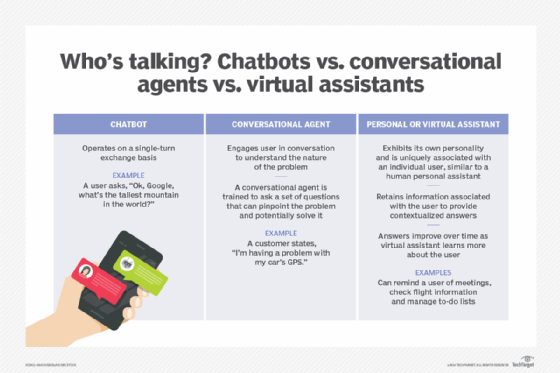
Acknowledging concerns around meeting assistants
As helpful as AI meeting assistants can be, they come with concerns as well. For those companies not yet allowing use of AI virtual assistants, 39.5% cited security concerns, and 26.3% said compliance management is an issue, according to the "AI for Business Success" study.
In Metrigy's annual "Workplace Collaboration and Contact Center Security and Compliance" study, 19% of participating organizations block collaboration apps they don't believe they can properly secure. Among those, nearly half block AI meeting assistants. Top concerns center around the inability to control access to meeting summaries and transcripts, and the inability to ensure compliance for meeting assets.
To allay these concerns, enterprises should create an AI usage governance strategy. Most of the companies Metrigy has studied have either a governance policy in place or are working toward rolling out one. Such policies most often include specifications for applying data privacy, security and compliance controls to AI-generated content and testing AI responses for accuracy.
2026 AI meeting assistants
While researching AI meeting assistants, Informa TechTarget editors and Metrigy focused on two segments of the market: unified communications providers that offer meeting applications and standalone vendors. Our research included market analysis of some of the leading options.
Keep in mind that, while the AI meeting assistants listed here clearly have similar capabilities, they might present certain features differently. For instance, one assistant may handle meeting summarization differently from another assistant. Again, enterprise leaders need to shop around to find the software that best suits their employees' needs.
In addition, enterprises must consider how well the product aligns with existing software. Enterprises, for example, may simply opt for Cisco or Microsoft assistants because those vendors are already deeply ingrained in their existing meeting workflows. Buyers should evaluate capabilities to support multiple meeting services, as well as the ability to use a mobile app to capture in-person meeting transcripts, or to record online meetings via speakerphone.
The following list of AI assistants to consider in 2026 is in alphabetical order.
1. AudioCodes Meeting Insights
AudioCodes Meetings Insights provides meeting summaries, action items, a searchable meeting repository, real-time transcription with speaker identification and a meeting prep feature. Available for use with Microsoft Teams and Zoom Meetings, AudioCodes Meeting Insights also includes integrations with software platforms, such as Salesforce, Monday and Zoho, to import meeting assets. Plans start at $10 per month.
2. Cisco Webex Assistant
Cisco Webex Assistant is free with paid Webex licenses. It features meeting catch-up, recap, summarization, transcription and translation. It also composes, modifies and summarizes messages as well as shares meeting summaries with third-party applications, including Microsoft Outlook, Copilot and Teams, plus Slack.
3. Fireflies.ai
Fireflies.ai is a cross-platform AI assistant that features meeting notes, summarization and transcription. It automatically syncs meeting notes, recordings and transcriptions with collaboration apps. Meeting analytics is available through the vendor's Conversation Intelligence suite, which provides insights on speakers, topics and sentiment. Fireflies.ai has a free version and three paid plans: $10, $19 and $39 -- all per seat, per month, billed annually.
4. Gemini for Google Workspace
Gemini for Google Workspace offers meeting notes with action items, catch-up, recap, summarization, transcription, translation -- including for live captions in real time -- and sentiment analysis. It also features message summarization and modification, and can help compose email, documents and messages. Additionally, employees can use Gemini to create background images, add a watermark to meeting video to protect confidential information, as well as enhance the look, light and sound of meetings. Gemini is included with Google Workspace Business Standard and above plans.
5. Microsoft Copilot in Teams
Much like other AI assistants, Copilot in Teams features meeting catch-up, recap, summarization, transcription, translation and sentiment analysis. It also composes, modifies and summarizes messages, and it supports action item tracking and intelligent search. Buyers can obtain Copilot by purchasing a Microsoft 365 Copilot license for $30 per user, per month, or a Teams Premium license for $10 per user per month. (More information about the differences between Copilot in Teams and Teams Premium is available here.)
6. Notta
Notta is an AI transcription, translation and meeting assistant that now includes capabilities from Airgram, following a merger in early 2024. Notta generates and shares meeting notes, gets meeting insights via prompt and creates customized meeting summaries, as well as auto joins Webex, Google Meet, Teams and Zoom Meetings, with auto transcription. For individuals, Notta offers a free version, plus a Pro plan at $13.49 per month. The vendor's Business plan costs $27.79 per user per month. Annual discounts are available.
7. Otter.ai Meeting GenAI
Otter.ai Meeting GenAI features meeting summarization, transcription and chat queries. It also helps compose email and offers cross-platform support. For post-meeting management, Otter.ai now offers My Action Items, which automatically identifies and captures action items across an employee's meetings -- regardless of the meeting app in use -- for centralized management. The Pro version of Otter.ai is $8.33 per user, per month. The Business version is $19.99 per user, per month. Annual discounts are available.
8. Zoom AI Companion 3.0
Zoom AI Companion 3.0 introduces an AI Companion side panel that uses prompt suggestions and generates answers, queries AI Companion for information outside of meeting context and continues to ask questions or refer to content discussed during a meeting. Additionally, AI Companion generates next steps and creates tasks from meeting summaries. Within the Zoom mobile app, a record button captures in-person meetings or meeting audio on speakerphone.
New in 3.0 is the ability to obtain insights across multiple interactions, including email, chat, documents and meetings. A custom option adds a glossary of terms for more refined meeting transcripts and tailored meeting summary templates. It also provides a personal coach on presentation and communication skills. Custom AI companion is priced at $12 per user, per month. The add-on augments the app's existing features, such as meeting catch-up, recap, summarization -- available for Microsoft Teams and Google Meet calls -- transcription, translation and sentiment analysis. It can also modify and summarize messages and compose messages and email.
Several other AI meeting assistants are available on the market. Research these powerful meeting tools carefully to find the best fit for your employees and workflows.
Editor's note: This article was originally written by Beth Schultz and updated by Irwin Lazar to refresh out-of-date data and provide insights into new AI meeting assistant capabilities.
Irwin Lazar is president and principal analyst at Metrigy, where he leads coverage on the digital workplace. His research focus includes unified communications, VoIP, video conferencing and team collaboration.
Beth Schultz is vice president of research and principal analyst at Metrigy. She focuses her research on unified communications, collaboration and digital customer experience.