7 data backup strategies and best practices you need to know
A strong data backup strategy is not an option; it is a requirement. Here are seven best practices organizations can implement to better protect and manage backups.

Production storage is increasingly reliable and resilient, but regularly creating and maintaining quality, independent backups of production data is more important than ever.
Especially with cloud backup in the mix, today's users and application owners expect no data loss, even in the event of a system or facilities outage. They also expect recovery times that are measured in minutes, not hours. Not meeting these expectations can not only have financial consequences, but could threaten the organization's reputation. This puts enormous pressure on leadership to create and enforce an effective backup strategy.
Fortunately, there are options. Backup software can provide capabilities such as in-place recovery, cloud tiering and automated recovery that enable an organization to provide rapid recovery without breaking the IT budget. Strategies such as increased backup scheduling and encryption can help maintain frequent, healthy copies of critical data.
Here are seven best practices IT and leadership can implement to strengthen a data backup strategy.
1. Push for a higher backup frequency
Because of ransomware and other emerging cyber threats, organizations must increase the frequency of backups -- once a night is no longer enough. All data sets, especially mission-critical data, should be backed up multiple times per day. Investing in technologies such as block-level incremental (BLI) backups enables rapid backups of almost any data set in a matter of minutes, because only the changed block, not the whole file, is copied to backup storage. Organizations should consider implementing some form of intelligent backup that enables rapid and frequent backups.
A close companion to BLI backups is in-place recovery, sometimes called instant recovery by vendors. Although not truly instant, in-place recovery is rapid: It instantiates a virtual machine's data store on protected storage, enabling an application to be back online in a matter of minutes instead of waiting for data to be copied across the network to production storage. A key requirement of a successful in-place recovery technology is a higher-performing disk backup storage area since it serves as temporary storage. If an organization plans on using in-place recovery, leadership must confirm with IT admins that the existing storage hardware is up to date and up to the task.
An alternative to in-place recovery is streaming recovery. With streaming recovery, the VM's volume is instantiated almost instantly as well, but on production storage instead of backup storage. Data is streamed to the production storage system, with priority given to data being accessed. The advantage of a streaming recovery over in-place recovery is that data is automatically sent to production storage, making the performance of the backup storage less of a concern.
Both technologies have advantages, but organizations should have one or both available to meet the expectation of minimal downtime. The combination of the granularity provided by BLI backups and in-place or streaming rapid recovery techniques means that near-high availability can be affordably distributed to most applications and data sets in the environment.
These approaches can provide a 15-to-30-minute recovery window. The few applications that demand a higher service level than what these approaches offer will require organizations to use something beyond backup for their most mission-critical applications -- a technology such as replication, for instance. If the organization is being realistic, then there should only be a few applications and data sets that fall into this category. For all other data sets, a combination of frequent block incremental backups and a rapid recovery will be sufficient and much more cost-effective.
2. Align backup strategy to service-level demands
A longstanding data center best practice has been to set priorities for each application in the environment. This practice made sense when an organization might have two or three critical applications and maybe four to five "important" applications. Today, however, even small organizations have more than a dozen applications, and larger organizations can have more than 50.
The recovery service level requires the organization to back up data as frequently as the service level demands. If the service level is 15 minutes, then backups must be done at least every 15 minutes.
The capabilities provided by rapid recovery and BLI backup ease some of the pressure for IT to prioritize data and applications. They can quite literally put all data and applications within a 30-to-60-minute window and then prioritize certain applications based on user response and demand. Thanks to modern technology, settling on a default but aggressive recovery window for all applications is affordable and more practical than performing a detailed audit of the environment. This is especially true in data centers where the number of applications requiring data protection is growing as rapidly as the data itself.
The cost of BLI backups and in-place recovery is well within the reach of most IT budgets today. Many vendors offer free or community versions, which work well for very small organizations. The combination of BLI and rapid recovery, both of which are typically included in the base price of the backup application, is far less expensive than the typical high availability system while providing almost as good recovery times.
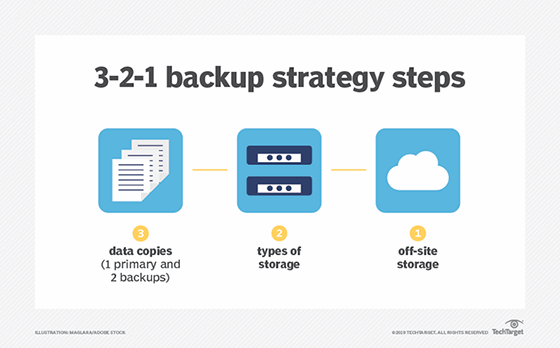
In addition to backup frequency, backing data up on multiple formats in different locations can help make sure that there is always a safe copy available. Many organizations follow the 3-2-1 rule, with three copies of data on two different media types and at least one copy in the cloud.
3. Incorporate the cloud thoughtfully
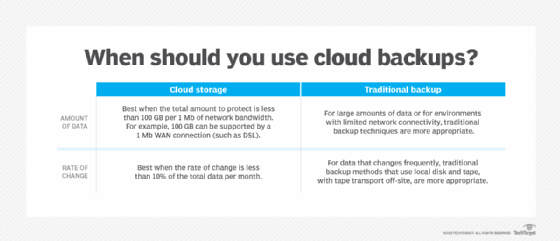
Organizations should continue to demonstrate caution when moving data to the cloud. The need for caution is especially true for backup data, since the organization is essentially renting idle storage. Although cloud backup has an attractive upfront price point, long-term cloud costs can add up. Repeatedly paying for the same 100 TB of data eventually becomes more expensive than owning 100 TB of storage. In addition, most cloud providers charge an egress fee for data moved from their cloud back on-premises, which applies whenever a recovery occurs. These are just a few reasons why taking a strategic approach to choosing a cloud backup provider is so important.
Considering the downsides, it's critical for leadership to take a strategic approach to the cloud. Smaller organizations rarely have the capacity demands that would necessitate expensive on-site storage hardware. Storing all their data in the cloud is probably the best course of action. Medium to larger organizations might find that owning their storage is more cost-effective, but those organizations should also use the cloud to store the most recent copies of data and use cloud computing services for tasks such as disaster recovery, reporting, and testing and development.
Cloud backup is also a key consideration for organizations looking to revamp their data protection and backup strategy. IT planners should be careful not to assume that all backup vendors support the cloud equally. Many legacy on-premises backup systems treat the cloud as a tape replacement, essentially copying 100% of the on-premises data to the cloud. Using the cloud for tape replacement does potentially reduce on-premises infrastructure costs, but it also effectively doubles the storage capacity that IT manages.
Some vendors now support cloud storage as a tier, where old backup data is archived to the cloud while more recent backups are stored on-premises. Using the cloud in this way enables the organization to meet rapid recovery requirements and lower on-premises infrastructure costs.
Vendors are also using the cloud to provide disaster recovery capabilities, often referred to as disaster recovery as a service (DRaaS). This technique uses not only cloud storage but also cloud compute to host virtual images of recovered applications. DRaaS can potentially save an organization a significant amount of IT budget compared to managing and equipping a secondary site on its own. DRaaS also facilitates easier testing of disaster recovery plans, which can lead to more frequent tests.
4. Consider automated recovery runbooks
The most common recoveries are not disaster recoveries; they are recoveries of a single file or single application. IT departments occasionally need to recover from a failed storage system, but it is extremely rare that they must recover from a full disaster, such as when the entire data center is lost. Leadership, of course, still must plan for the possibility of this type of recovery. In a disaster, IT departments must recover dozens of applications, and those applications might depend on other processes running on other servers. In many cases, the other servers must become available in a very specific order. The timing of when each recovery can start is critical to success.
The combination of the infrequency of an actual disaster with the dependent order of server startup means that the organization's disaster recovery process must be carefully documented and executed. The problem is that in today's stretched-too-thin data center, these processes are seldom documented. They are updated even less frequently.
Some backup vendors now offer runbook automation capabilities. Implementing these features enables the organization to preset the recovery order and execute the appropriate recovery process with a single click. Any organization with multi-tier applications that have interdependent servers should seriously consider these capabilities to help ensure recovery when it is needed most.
5. Keep long-term data backups in the archives
Many organizations retain data backups for far too long. Typical recoveries use the most recent backup, not from a backup that is six months -- let alone six years -- old. The more data an organization stores within the backup infrastructure, the more difficult it is to manage and the more expensive it becomes.
A downside to most backup applications is that they store protected data in a proprietary format, usually in a separate storage container for each backup job. The problem is that individual files can't be deleted from these containers. Certain regulations, such as GDPR, require organizations to retain and segregate specific data types. Regulations with "right to be forgotten" policies require that organizations delete only certain components of customer data and continue to store other customer data. In addition, these deletions must be performed on demand. Because deletion of data within a backup is an impossibility, the organization might need to take special steps to ensure that "forgotten" data is not accidentally restored.
The easiest way to meet this regulation is not to store data long-term in the backup infrastructure. Using an archive product for retaining data enables organizations to meet various regulations around data protection while also simplifying the backup architecture. Typically, archive systems are sold to reduce the cost of primary storage, and while that is still true, their key value is helping organizations meet retention requirements. As a result, organizations can simply restore from backup jobs to the archive, which is an off-production process and provides file-by-file granularity.
6. Implement protection for endpoints and SaaS applications
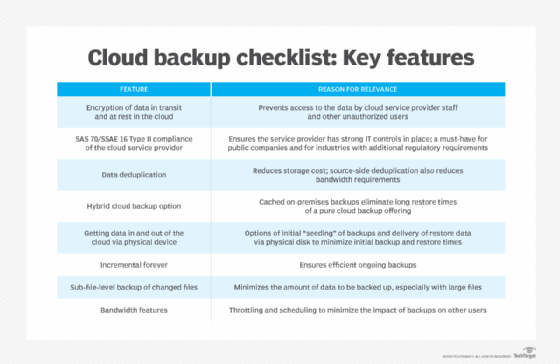
Endpoints -- laptops, desktops, tablets and smartphones -- all contain valuable data that might be uniquely stored on them. It is reasonable to assume that data created on these devices might never be stored in a data center storage device unless specifically backed up, and that data will be lost if the endpoint has a failure, is lost or is stolen. The good news is that endpoint protection is more practical than ever, thanks to the cloud. Modern endpoint backup systems enable endpoints to back up to a cloud repository, managed by core IT.
A general and incorrect assumption is that data on SaaS platforms is automatically protected. The reality is that SaaS user agreements make it very clear that data protection is the organization's responsibility. Leadership and IT planners should look for a data protection application that protects the SaaS offerings they use. Ideally, these offerings are integrated into their existing system, but organizations could also consider deploying SaaS-specific systems if they offer greater capabilities or value.
7. Emphasize strong backup security
Data is every organization's most valuable asset, and it must be protected as such. Business data often contains sensitive customer information and corporate details that could harm the organization if stolen or compromised. Stolen backup data, for example, could readily violate regulatory obligations, expose the business to litigation and jeopardize its competitive position. Extreme cases, such as ransomware infiltration, might even bring the enterprise to a halt.
Backups require the same level of security as production data. Three major techniques can strengthen backup security: encryption, air-gapping and strict authentication requirements.
Encryption uses a mathematical algorithm to scramble data as it’s prepared and transferred to the backup media. The algorithm requires a user-selected code or encryption key that only the user knows. When the backup is restored, the key can be used to reverse the mathematical process and restore the data to its plain (unencrypted) state. The organization’s backup platform should have encryption enabled, and any key should be included in a key management application. Even if the backup is stolen or its data improperly accessed, the content of that data must remain scrambled and unreadable.
Air-gapping is designed to separate the backup and backup system from the principal network. Physical air gaps literally isolate the backup from any connection, such as a tape removed from a tape drive. Air gaps can also be logical, using additional software and a carefully designed network architecture to limit access to the backup system and media, including a backup server and its disks. Implementing air gaps is one of the strongest ways to protect backups from ransomware attacks.
Strong authentication ensures only authorized users can configure, invoke, access or recover backups. This approach typically requires specialized credentials -- perhaps using multifactor authentication -- to validate the administrator’s identity. Organizations are increasingly adopting multifactor authentication requirements to access business data, adding an extra layer of protection.
Stephen J. Bigelow, senior technology editor at TechTarget, has more than 30 years of technical writing experience in the PC and technology industry.
George Crump contributed to this article.